
American Airlines Mobile ID delivers a more seamless, touchless travel experience for American Airlines customers enrolled in TSA PreCheck. Launched recently at Dallas Fort Worth International Airport, the Mobile ID allows AAdvantage members with PreCheck to verify their identity at select checkpoints. American Airlines plans to expand the service to additional airports later this year, including Miami (MIA), Phoenix (PHX) and Washington, D.C. (DCA).
© Airside
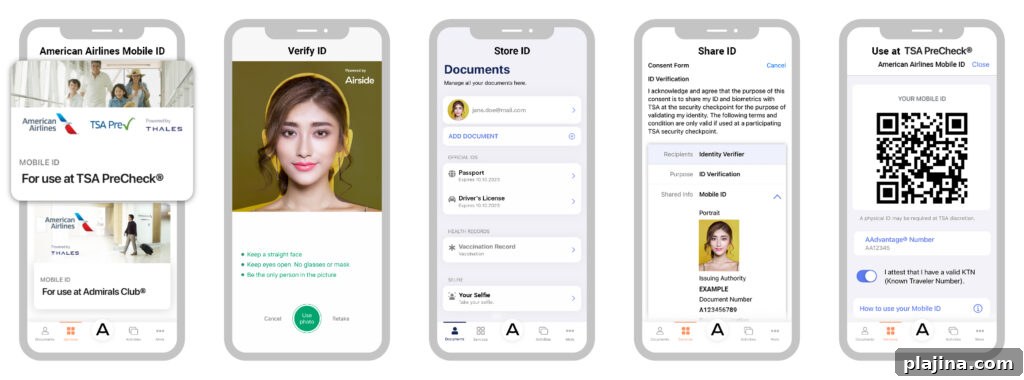
Creating and storing an American Airlines Mobile ID is straightforward. Travelers should download the Airside Digital Identity app on an iOS or Android device, take a photo of their face, scan a driver’s license or passport, and enter their AAdvantage number. The app verifies the information and securely stores the digital ID on the customer’s device until they choose to use it.
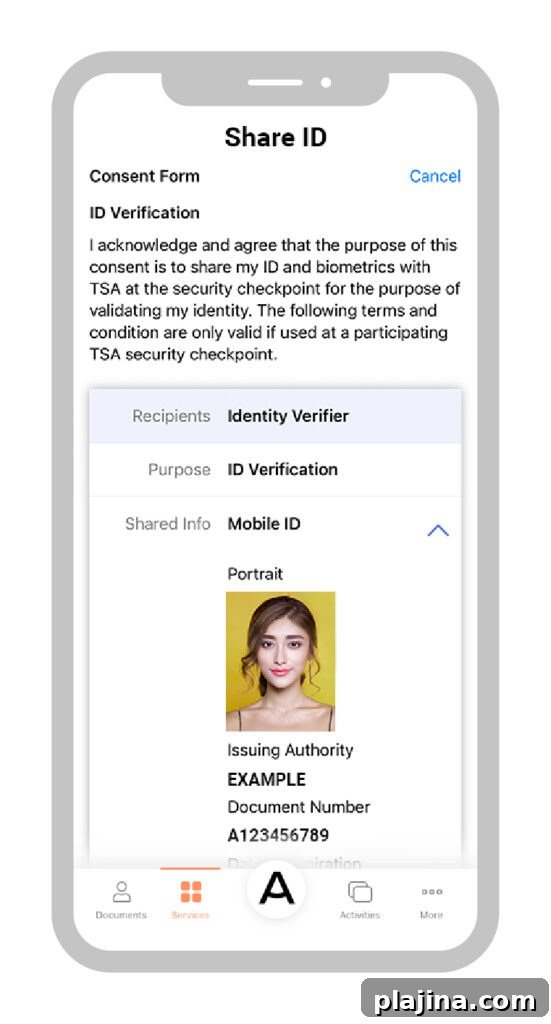
At the security checkpoint, travelers present a QR code on their phone to consent to share the Mobile ID with TSA. The passenger then looks into a camera at the TSA PreCheck lane while the system matches the encrypted image to the Mobile ID. The verification typically completes in less than five seconds, reducing contact and shortening wait times.
© Airside
“We’re committed to making our customers’ journeys easier, and airport waypoints provide significant opportunities for innovation,” said Julie Rath, vice president of Customer Experience, Loyalty and Marketing at American Airlines. “By simplifying identity verification and other touchpoints at the airport, we help customers trade stress for convenience and saved time, and move the travel industry closer to a truly seamless experience.”
After verification, TSA deletes the encrypted digital ID from checkpoint readers, while travelers retain their Mobile ID on their device for future use. This approach balances convenience with privacy and security, allowing customers to use a secure, touchless identity option at participating airports.